
FacebookInstagramXWhatsApp
ExpatSaudi
ExpatSaudi

سعودی عرب میں مقیم اور کام کرنے والے تارکینِ وطن کے لیے قابلِ اعتماد معلومات۔

کمپنی

  • ہمارے بارے میں
  • رابطہ کریں

زمرہ جات

  • لیبر قانون
  • ویزا اور امیگریشن
  • اقامہ اور رہائش
  • کام اور روزگار
  • خاندان اور انحصار کرنے والے

وسائل

  • تمام مضامین
  • سعودی ٹولز
  • ہنگامی نمبرز
  • کارآمد ایپس

قانونی

  • پرائیویسی پالیسی
  • استعمال کی شرائط
  • دستبرداری

© 2026 URExpat. تمام حقوق محفوظ ہیں۔

پرائیویسی پالیسی·شرائط و ضوابط

ہوممضامیناقامہ اور رہائشHow to Update Your Mobile Number in Absher
اقامہ اور رہائشاپ ڈیٹ شدہ2 منٹ مطالعہ

How to Update Your Mobile Number in Absher

Need to change the phone number linked to your Absher account? Follow these simple steps to update your registered mobile number in Saudi Arabia.

Devnex Logo

دیو نیکس

ٹیم سے تصدیق شدہ

شائع ہوا 19 اگست، 2026 19 اگست، 2026
Update Mobile Number Featured Image

مضامین کا جدول

Steps to Update Your Mobile Number in Absher1. Open the Absher Mobile App2. Select “Change Mobile Number”3. Enter Your Identity Details4. Enter Your New Mobile Number5. Complete the VerificationImportant Things to Know

How to Update Your Mobile Number in Absher

If you have changed your phone number and want to update the number linked to your Absher account, you can do it directly through the Absher app.

The process is straightforward and only takes a few steps.

Steps to Update Your Mobile Number in Absher

1. Open the Absher Mobile App

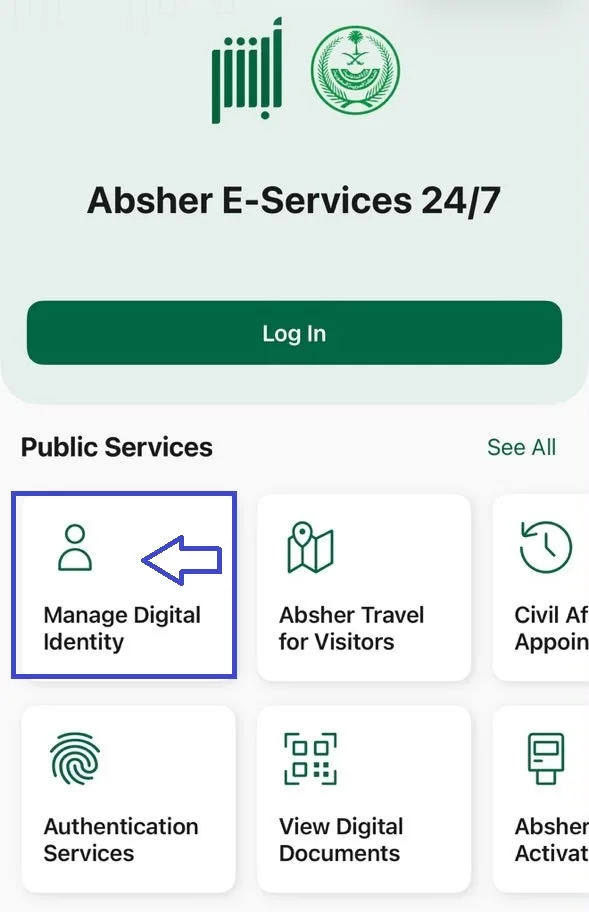
Open the Absher Mobile app on your smartphone and click on Manage Digital Identity.
Absher Home Image

2. Select “Change Mobile Number”

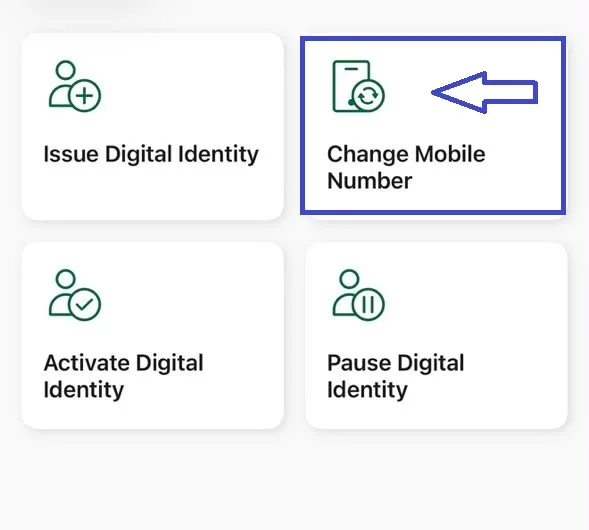
Inside Manage Digital Identity, you will see several options.

Select Change Mobile Number to start the process.
Change Mobile Number Image

3. Enter Your Identity Details

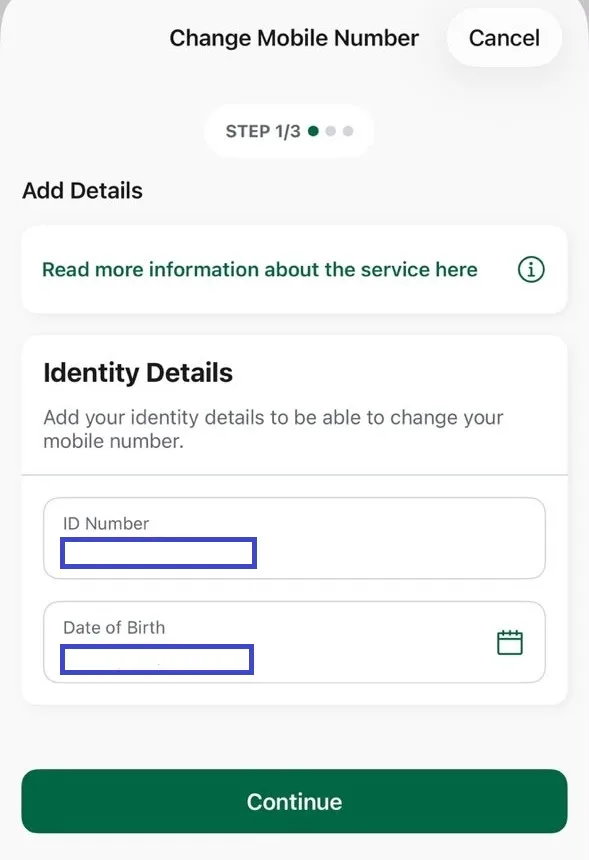
The service will ask you to provide your identity details.

Enter or confirm your ID Number and Date of Birth, then tap Continue.
DOB and Iqama Number Image

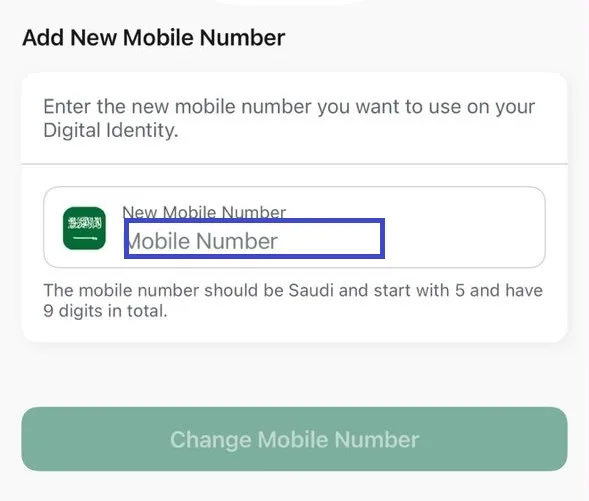
4. Enter Your New Mobile Number

Enter the new Saudi mobile number you want to use with your Absher account.

The service indicates that the mobile number should be a Saudi number starting with 5 and contain 9 digits.

After entering the number, select Change Mobile Number.
Change Mobile Number Image

5. Complete the Verification

Follow the instructions shown by Absher to complete the verification process.

Once the process is completed successfully, your new mobile number will be linked to your digital identity.

We don't need a screenshot here since you don't have a final confirmation screen.

Important Things to Know

Before starting the process, make sure:

  • Your new mobile number is active and available to you.
  • The number meets Absher's requirements.
  • Your smartphone can capture images using its front and back cameras, as indicated in the service information.
  • The new number is registered in your name or the name of one of your family members.

These requirements are shown directly in the Absher service information screen you captured.

سرکاری ذرائع کے لنکس

Absher — Official PlatformAbsher — Change Mobile Number Service

یہ مضمون شیئر کریں

دوسروں تک یہ مفید معلومات پہنچانے میں مدد کریں۔

مضامین کا جدول

Steps to Update Your Mobile Number in Absher1. Open the Absher Mobile App2. Select “Change Mobile Number”3. Enter Your Identity Details4. Enter Your New Mobile Number5. Complete the VerificationImportant Things to Know

متعلقہ مضامین

سعودی عرب میں ابشر اکاؤنٹ کیسے بنائیں

2 منٹ مطالعہ

نفاذ کے ذریعے ابشر اکاؤنٹ کیسے ایکٹیویٹ کریں

2 منٹ مطالعہ