
FacebookInstagramXWhatsApp
ExpatSaudi
ExpatSaudi

سعودی عرب میں مقیم اور کام کرنے والے تارکینِ وطن کے لیے قابلِ اعتماد معلومات۔

کمپنی

  • ہمارے بارے میں
  • رابطہ کریں

زمرہ جات

  • لیبر قانون
  • ویزا اور امیگریشن
  • اقامہ اور رہائش
  • کام اور روزگار
  • خاندان اور انحصار کرنے والے

وسائل

  • تمام مضامین
  • سعودی ٹولز
  • ہنگامی نمبرز
  • کارآمد ایپس

قانونی

  • پرائیویسی پالیسی
  • استعمال کی شرائط
  • دستبرداری

© 2026 URExpat. تمام حقوق محفوظ ہیں۔

پرائیویسی پالیسی·شرائط و ضوابط

ہوممضامیناقامہ اور رہائشHow to Check How Many SIM Cards Are Registered Under Your Iqama
اقامہ اور رہائشاپ ڈیٹ شدہ1 منٹ مطالعہ

How to Check How Many SIM Cards Are Registered Under Your Iqama

Saudi residents can check the SIM cards registered under their Iqama through Tawakkalna. Simply log in, open Services, and select Argami to view your registered numbers.

Devnex Logo

دیو نیکس

ٹیم سے تصدیق شدہ

شائع ہوا 18 اگست، 2026 18 اگست، 2026
Sim Check Image

مضامین کا جدول

How to Check SIM Cards Registered Under Your IqamaSteps to Check Your Registered SIM Cards1: Open Tawakkalna2. Enter Your Details3. Open Services4. Select Argami5. View Your Registered SIM CardsWhy Should You Check Your Registered SIM Cards?

How to Check SIM Cards Registered Under Your Iqama

If you want to know how many SIM cards are registered under your Saudi Iqama, you can check them through the Tawakkalna app.

The process is simple and only takes a few steps.

Steps to Check Your Registered SIM Cards

1: Open Tawakkalna

If you already have the Tawakkalna app installed, simply open it. If you don't have it yet, download and install it on your smartphone:

  • Android: Download Tawakkalna from Google Play
  • iPhone: Download Tawakkalna from the App Store

2. Enter Your Details

Log in using your mobile number and Iqama ID.

3. Open Services

After logging in, go to the Services section in the Tawakkalna app.

View all

4. Select Argami

Find and select Argami from the available services.
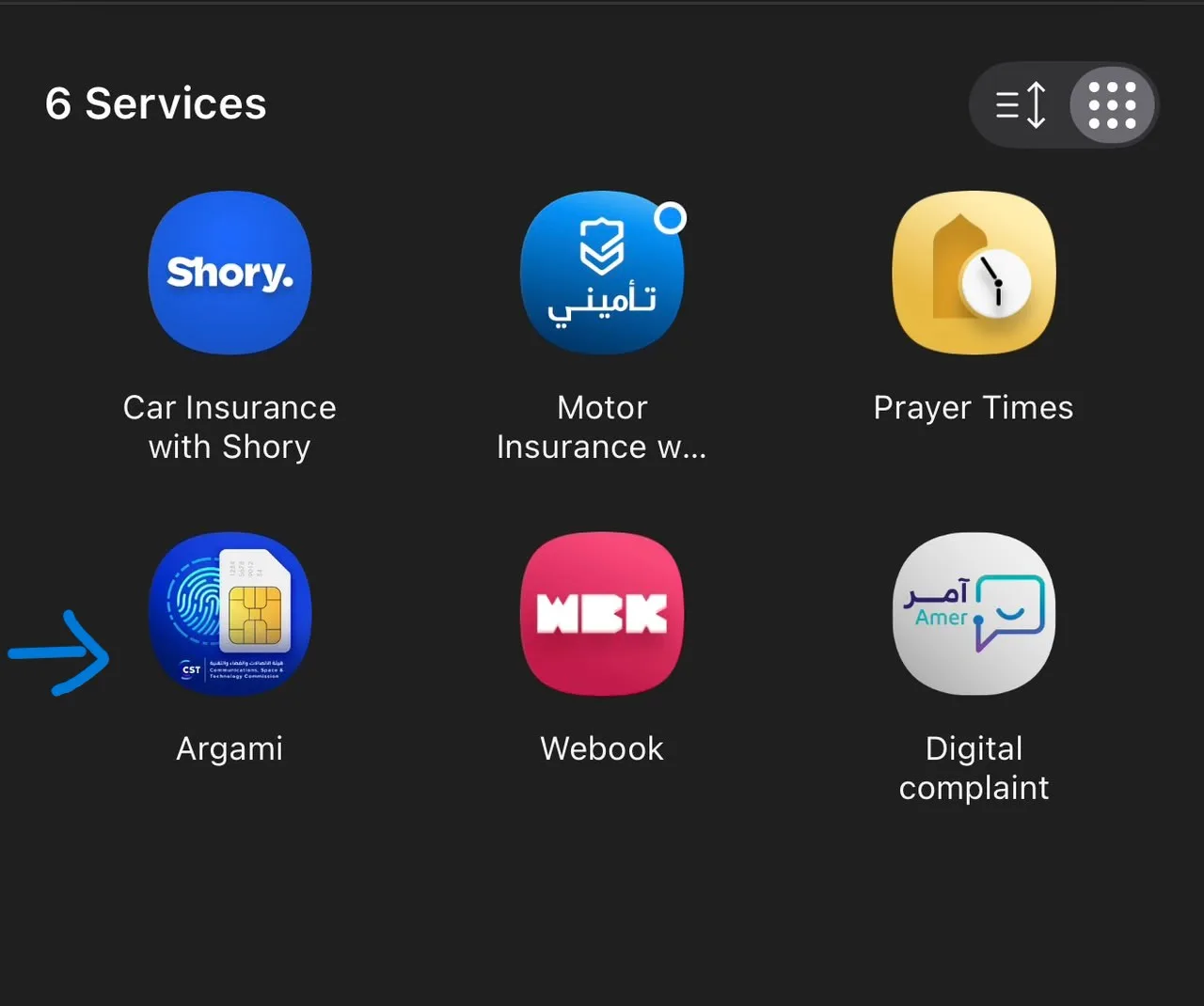
Select Argami

5. View Your Registered SIM Cards

The Argami service will show the mobile numbers and SIM cards registered under your Iqama.

You can use this service to check whether the numbers registered under your ID are familiar to you.

Why Should You Check Your Registered SIM Cards?

Checking your registered numbers can help you keep track of the SIM cards associated with your Iqama. If you notice a number that you do not recognize, you should contact the relevant telecom provider for assistance.

سرکاری ذرائع کے لنکس

CST — Inquire About My Numbers

یہ مضمون شیئر کریں

دوسروں تک یہ مفید معلومات پہنچانے میں مدد کریں۔

مضامین کا جدول

How to Check SIM Cards Registered Under Your IqamaSteps to Check Your Registered SIM Cards1: Open Tawakkalna2. Enter Your Details3. Open Services4. Select Argami5. View Your Registered SIM CardsWhy Should You Check Your Registered SIM Cards?

متعلقہ مضامین

سعودی عرب میں ابشر اکاؤنٹ کیسے بنائیں

1 منٹ مطالعہ

نفاذ کے ذریعے ابشر اکاؤنٹ کیسے ایکٹیویٹ کریں

1 منٹ مطالعہ

اپنے سعودی ایگزٹ/ری-انٹری ویزا کی قسم، درستگی، اور تفصیلات آن لائن کیسے چیک کریں (2026 گائیڈ)

1 منٹ مطالعہ